Getting started
From upload to embed in a few minutes.
No setup, no config files. Sign up, upload, and you've got a clean player and an embed you can drop anywhere. Here's the whole path.
The first 10 minutes
Host, embed, share.
Every step here works on every plan, including Free — no upgrades needed to run the whole loop.
Create your account
Pick a plan on the signup page and you're in. Free needs no credit card. Paid plans open a secure Stripe checkout — either way we email you a link to set your password and sign in at console.stillhaven.io.
Free forever includes real hosting, captions, and the branded player — enough to run the whole loop before you pay.

Upload your first video
From the dashboard, choose Upload. Drop in a file up to 100 GB, pick landscape or portrait (no black box), optionally add a transcript, and choose a folder to file it in. We transcode it into adaptive quality automatically and, if you asked for a transcript, generate captions — no settings to wrangle.
Uploads go straight from your browser to storage, so even big files don't crawl through a middleman. You'll see a processing indicator while it's transcoding.


Make it yours
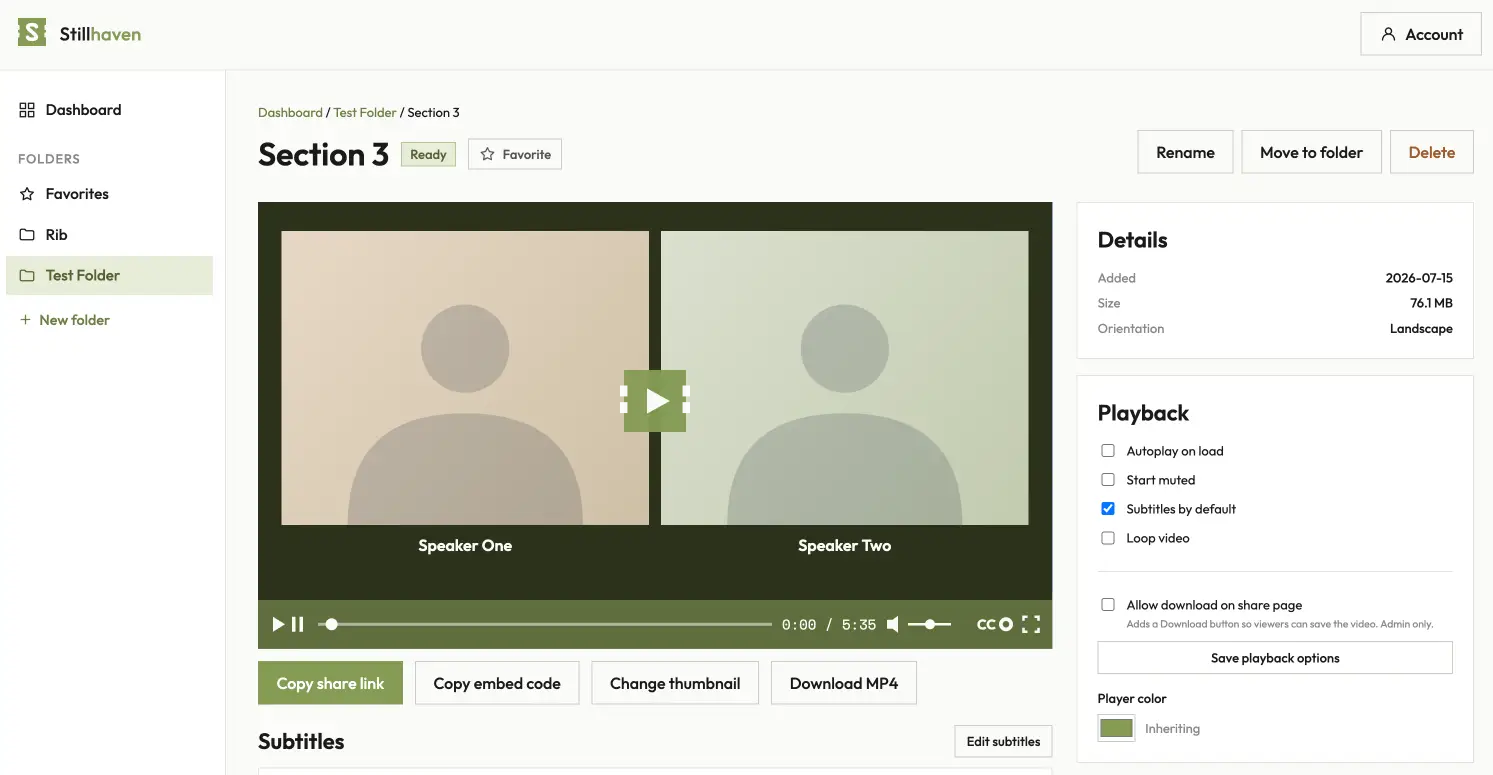
Open the video to set a thumbnail (pick a frame or upload your own), tweak playback options (autoplay, start muted, loop, subtitles on), fix any words in the auto transcript, and set a player accent color. All optional — it's already shareable.

Share it or embed it
Two buttons. Copy share link hands over a clean, brandable page for the video. Copy embed code gives you a responsive snippet that drops into any site — WordPress, Webflow, your own build. No ads, no "up next," no competitor logos.
On Free, embeds carry a small Stillhaven mark; every paid tier is completely clean. You decide whether viewers can download the original.


That's the loop — host, embed, share. Everything below is for when you want more.
Go further
When you want more.
Organize as you grow
Folders nested up to three deep, color tags for quick scanning, favorites for the ones you reach for, and move-between-folders. Delete is safe — videos go to Trash with a 30-day restore.

Limit where your videos play
Two controls, one promise: your lessons only play on your site.
Allowed domains. On the video page, open the Embeds panel and
list the sites that may embed the video. Use *.example.com to cover a
site and all of its subdomains. Embeds anywhere else show a calm blocked screen instead of your
video. Included on every paid plan, and you can set a default for your whole library in
Settings.
Share page. Every video gets a public Stillhaven page by default. Turn it off in the Share page panel and the video plays only in your embeds (and channels, from Creator up). Links you already shared will stop working, so flip it before you share, not after. On every plan.
Watch it work. The Sources panel on each video shows where it loads, plays, and gets blocked, by site name. If your own site ever shows the blocked screen, look there first: a blocked entry that looks like your site is flagged, with the fix one click away.
Course lessons, client work, videos that live inside an app: lock the domains and turn the page off, and they play on your site and nowhere else.
Brand the player and pages Creator and up
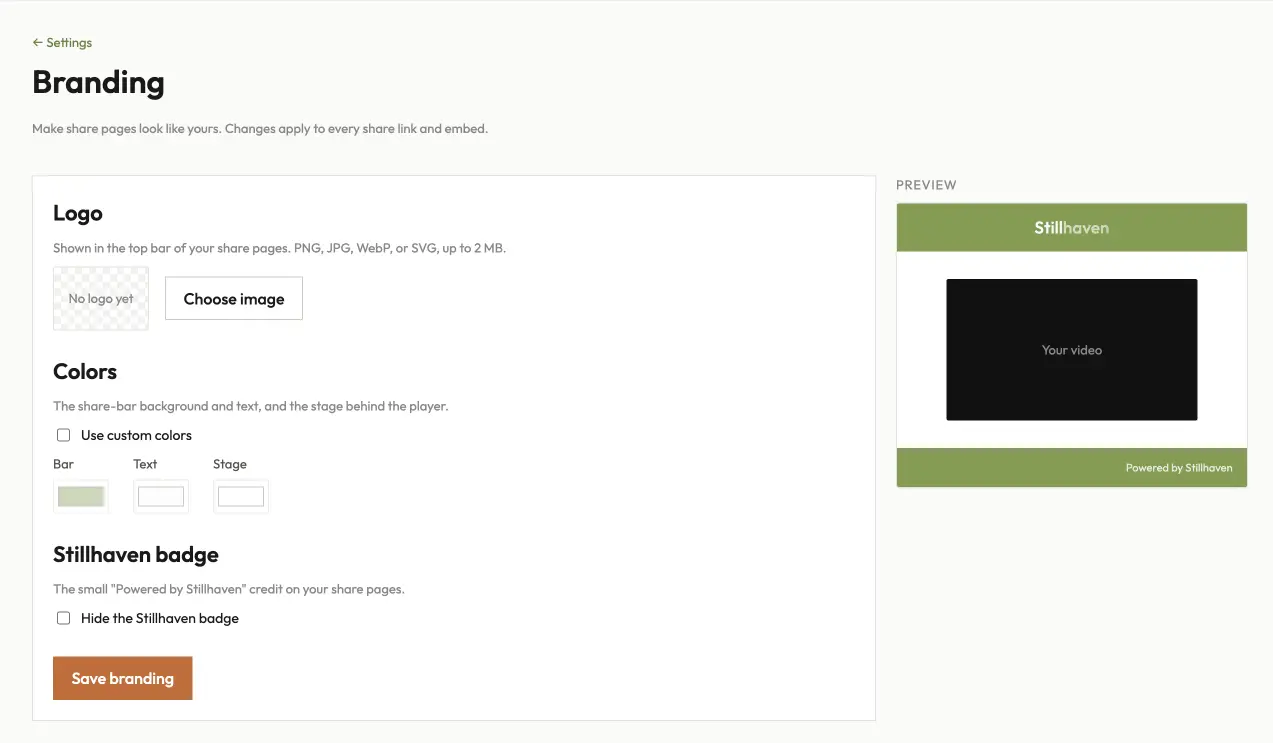
Available on Creator accounts and above — logo, theme colors, and badge removal are all included, on every paid plan.
Add your logo to share pages, set theme colors, and remove the Stillhaven badge. Set a default player accent per folder or per video — that part's on every plan, including Free.
Record instead of uploading Every plan
Free records up to five minutes at a time; paid plans have no limit. Trim and fades after the fact are on Studio and Broadcast.
Choose Record from the dashboard, pick your screen, your camera, or both, and press Start. Parts are saved to your library as you go, so a closed tab loses seconds, not the recording. When you stop, name it, decide whether people can comment and react, tick Email me when it's ready, and Save. The share link works straight away: it shows a holding page until processing finishes, then the video.
Gather videos into a channel Creator and up
Public channels are on Creator and above; private channels (invite-only sign-in) and the CRM API are on Studio and Broadcast.
Get notes back, or drive it from your own tools
Every paid plan.
Client review and approvals. Send a share link and get notes back, each stamped to the second it refers to and marked on the timeline. Reviewers leave a name and a comment without making an account, you reply or resolve, and they sign off when the cut is right.
Password-protected share pages. Put a password on any share page. A protected page also stops generating link previews, so a forwarded link cannot show a frame to somebody it was not meant for.
Expiring links, and send by email. Create a link that stops working after six hours, a day, or up to thirty days; it opens a video even when its share page is off, so one person gets in without the video going public. Or send the video to up to ten people from the video page, with a note, and each gets their own email the moment it is ready.
An API, and a Claude connector. A documented REST API with scoped keys, or connect Stillhaven to Claude and ask for what you want. Keys are created in Settings → API. See the API reference and how to connect Claude.
A branded, playlist-style page at your own URL for a series, an event, or a course. Keep it public, or make it private with password / magic-link sign-in, per-viewer watch tracking, and access you can sync from your CRM (HubSpot, Ontraport, Zapier, or the REST API).


Bring your team
Available on every plan; how many seats you get scales with it — Free includes 1 manager and 5 viewers, up to 15 managers and 100 viewers on Broadcast.
Invite teammates by email as Admin, Editor, or Viewer (viewers are the big, cheap seat pool for private-channel members). Teammates can sign in with Google, a magic link, or email and password.

See what's landing
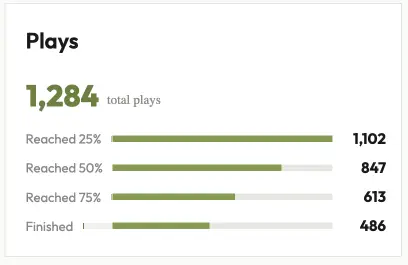
Every video reports total plays and 25 / 50 / 75 / 100% completion; the dashboard shows account-wide analytics plus storage and bandwidth against your plan. Then sources: the sites where each video loads, plays, and gets blocked. Site names only, nothing about the viewer.

Good to know
The week-one questions.
- What am I billed for?
- Two meters — storage (your library) and monthly bandwidth (how much your audience watches). No hidden fees. See pricing.
- What if I hit a limit?
- On Free, playback pauses at the monthly bandwidth cap and resets next cycle — nothing is deleted. On paid plans, overage bills at a low per-GB rate, or you prepay a block.
- How private is it?
- There is no feed and no recommendations, and media is delivered over a CDN with short-lived signed links. You choose whether a video is downloadable, and channels can be private with per-viewer sign-in from Studio up. On any paid plan you can lock a video to your own domains and put a password on its share page.
- Can I change or cancel anytime?
- Yes — it's self-serve, with a live proration preview on upgrades and a 30-day restore window if you fully cancel. A paid plan cancelled inside its first 30 days is refunded in full.
- Need a hand?
- We answer plainly and quickly. Support or contact us.
More documentation
-
Embedding video
The share link, the embed code, Allowed domains, and the oEmbed endpoint editors use to turn a pasted link into a player.
-
API reference
The REST API: videos, folders, channels, uploads, analytics, and the OpenAPI spec.
-
Claude connector
Read and organise your library from Claude: how to connect, what it can do, and what it cannot.
All of it, in one place: /docs.
Ready when you are.
Free forever, no credit card, up to 30 minutes of new video a day. Host a video, grab the embed, and see how quiet it can be.
Start free